Building a Real-time Blog with Skip and PostgreSQL
Hello Skippers. Today, we are going to plug a PostgreSQL service and our starting point is the following project on GitHub: Skip Postgres Demo. We will demonstrate how to use Skip's reactive data streaming with a PostgreSQL backend. This project implements a simple blog post system with real-time updates using Skip's streaming capabilities.
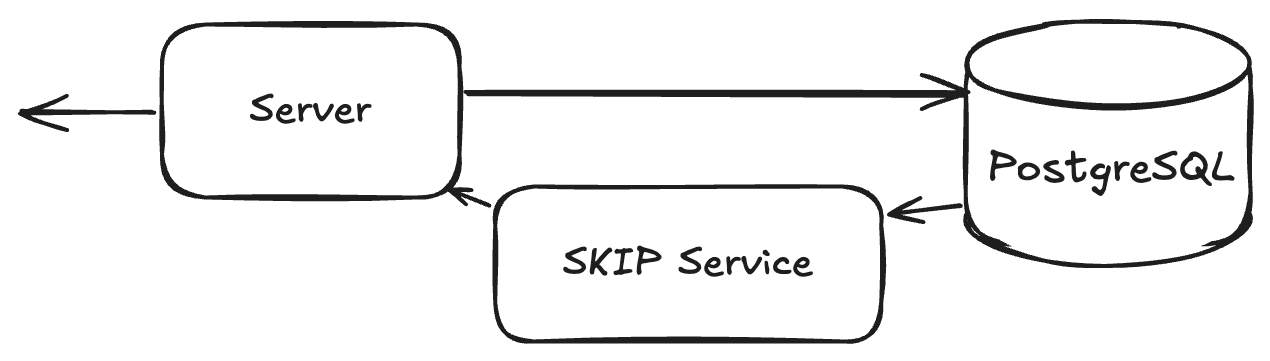
Before we get too far ahead, two things…(1) what you need and (2) what you will learn:
What you need:
- Node.js (Latest LTS version recommended)
pnpmpackage manager- Docker (for PostgreSQL)
- (optional) a Json pretty printer in the terminal, I use jq
What you will learn:
- Real-time post streaming using Skip's reactive data system
- PostgreSQL integration for data persistence
- RESTful API endpoints for post management
- Support for streaming data access
Okay..ready?….let's go!
We are starting from a REST server for the simplest blog post system and we are going to add real-time updates features to it. Let's check out the project:
git clone https://github.com/SkipLabs/postgres_and_skip_poc.git
cd postgres_and_skip_poc/
git checkout $(git rev-list --max-parents=0 main)
And yes, you are right we are not starting on top of the main branch, but don't worry we'll get there in no time.
Run the init_and_start_server.sh script, it will start a PostgreSQL database in a Docker container and fill it in with some data. It will then install and build the whole project with pnpm to finally start it!
./init_and_start_server.sh
The last lines should look something like:
🚀 Starting server...


> skip-postgres@1.0.0 start /your/path/skip-postgres
> node dist/index.js

Server running at http://localhost:3000
In a new terminal, we are going to check that the REST API is up: First, let's display one of the articles:
curl localhost:3000/posts/7 | jq
Note that here there's an easy shortcut - I use jq, which will make life more convenient to read JSON output.
As you can see, the article is not published:
  "published_at": null,
  "created_at": "<some_date>",
  "updated_at": "<some_date>"
We are going to publish and unpublish it:
curl -X PATCH http://localhost:3000/posts/7/publish | jq
curl -X PATCH http://localhost:3000/posts/7/unpublish | jq
You should see the modification as results of the calls.
A working REST API.
And now here comes the fun part, let's make it a reactive API
The Skip Service
First of all, kill your running server. We are about to checkout the top of the main branch and install the necessary bits:
git checkout main
pnpm add -D @skipruntime/core @skipruntime/helpers @skipruntime/server
pnpm add @skip-adapter/postgres
A Skip service has collections as inputs and mappers to transform them into resources as outputs.
In our case, in file skipservice.ts you will find:
-
A type you want to be notified about:
PostWithAuthorwhich contains information from two tables: Users and Posts (seeschema.sql). -
A mapper
PostMapperwhich creates instances of this type from anEagerCollection(anEagerCollectionis always kept up-to-date). -
A resource
PostResourcewhich implements a function from aPostsResourceInputsto anEagerCollection<number, PostWithAuthor>
And it is when we instantiate our service that we plug it to the PostgreSQL, when we define an instance of SkipService, we receive a context as input. This context provides a method useExternalResource.
Remember that in Skip, Resources are the outputs of your service that clients can subscribe to, while Collections are the inputs that feed data into your service. When you create a graph using createGraph, you define how these Collections are transformed into Resources. Once you've set up your graph and connected it to your external services (like PostgreSQL in our case), you just need a few lines of code in your server to expose these Resources to clients:
app.get(
 '/streams/posts/:uid',
 asyncHandler(async (req, res) => {
   const uid = Number(req.params.uid);
   const uuid = await serviceBroker.getStreamUUID('posts', uid);
   res.redirect(301, `${SKIP_READ_URL}/v1/streams/${uuid}`);
 })
);


app.get(
 '/streams/posts',
 asyncHandler(async (req, res) => {
   const uuid = await serviceBroker.getStreamUUID('posts');
   res.redirect(301, `${SKIP_READ_URL}/v1/streams/${uuid}`);
 })
);
You can find these lines in src/index.ts#L65-L80
We are adding two endpoints:
/streams/posts/:uidwhich is a stream of changes for a given post of id uid/streams/postswhich is a stream of changes for the entire posts table
Let's play with it, in three terminals:
Terminal 1: Start the Server
./init_and_start_server.sh
Server and services are ready when you see:
Skip control service listening on port 8081
Skip streaming service listening on port 8080
Server running at http://localhost:3000
Terminal 2: Subscribe to Post Updates
curl -LN http://localhost:3000/streams/posts/7 | \
  while read -r line; do
    echo "$line" | grep '^data:' | sed 's/^data: //' | jq .
  done
💡 Note: The shell command above includes some formatting magic to make the output readable. It filters for data lines and pretty-prints the JSON using
jq.
Terminal 3: Modify the Post
curl -X PATCH http://localhost:3000/posts/7/publish | jq
curl -X PATCH http://localhost:3000/posts/7/unpublish | jq
Watch Terminal 2 while you run these commands in Terminal 3 - you'll see the real-time updates!
Wrap-up
In our previous blog post, we have walked you through how to create a Skip service for a reactive social network, with code! Check it out here: Reactive Social Network Service (Proof of Concept).
Now we have learned how to plug a PostgreSQL service using Skip!
What's Next?
For the next Skip article, what should I tackle first? You tell me!
- Scaling your Skip service horizontally?
- Integrating with frontend frameworks like React?
- Managing authorization and privacy per user?
- What else would be most useful to you NOW?